Minister of Education Award 2023 · Google Certified Trainer
Proof in numbers
200+schools on Google Workspace I rolled out and support (Ulsan, since 2022)
10+/wksupport requests a week on accounts and classroom use
≈500students a year use the AI systems I run
68 → 198chose Informatics after my Grade 10 class (school count); about 130 changed their intended major or career path
Counts come from school records and my own system logs. I have not yet counted the total number of teachers trained, so it is not listed.
01Case studies
Each one: the problem, what I did, what changed, and how I would run the same thing with Microsoft 365 Copilot.
A · Ulsan Metropolitan Office of Education · 2022–
Rolling out one platform to 200+ schools
Problem
Get 200+ Ulsan schools onto one platform on one domain, with accounts, security and data rules, and training in place.
Approach
Set up the domain, API quotas, and security and data-compliance settings. Ran hands-on trainings on teaching with the tool, not just clicking through it. Kept a support line open: 10+ requests a week.
Result
200+ schools on one platform since 2022, still supported every week.
With Copilot
Same order: tenant readiness and data protection first, a champion in each school, prompt patterns tied to real lessons, a usage review every term.
B · school-ai · Haksung High School
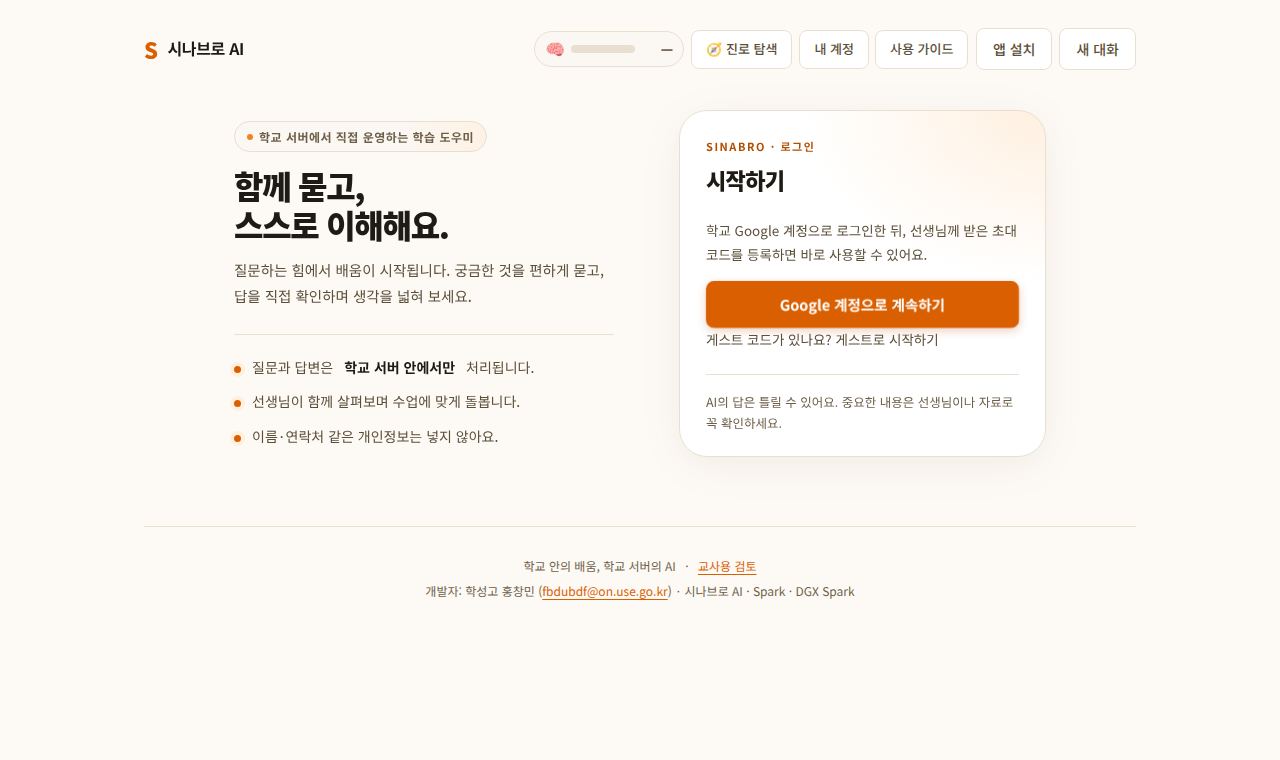
Safe AI for about 500 students a year, without student data leaving school
Problem
Students needed AI, but their data couldn't leave the school.
Approach
Won funding with a live local-LLM demo to the regional education office: two NVIDIA GB10 workstations (DGX Spark-class), about 20 Jetson Orin Nanos, a Mac Studio and a MacBook.
Built school-ai: a FastAPI gateway on vLLM with sign-up, usage limits, guardrails, RAG and a teacher review console, reachable only through Cloudflare Tunnel.
Picked the model on a benchmark of real student tasks: run code, make slides, refuse to invent facts.
Audited all 14 public subdomains.
Result
On the same machine, Gemma 4 26B passed 57 of 58 teaching items (Qwen3.8 27B: 52), and the median finish time for 20 simultaneous student questions fell from 115 s to 63 s. The audit tightened login and exposure settings on both machines.
With Copilot
In K-12 tenants, Copilot Chat is off by default for students aged 13–17 until an admin sets age groups (Microsoft Learn). That is the same kind of decision I already make: who gets AI, with which limits, reviewed by whom.
school-ai sign-in screen (Korean). The note on the left says questions and answers are processed only on the school server.
C · Data Explorer Cards and PyCode Racer · 2026
Using usage data to decide what to teach next
Problem
A review app is only useful if you can see where students struggle.
Approach
Built Data Explorer Cards (266 concept cards, quizzes, rubric-scored written answers) and PyCode Racer (39 code missions and a self-assessment), each with a teacher view. Answers and scores are computed on the server.
Result
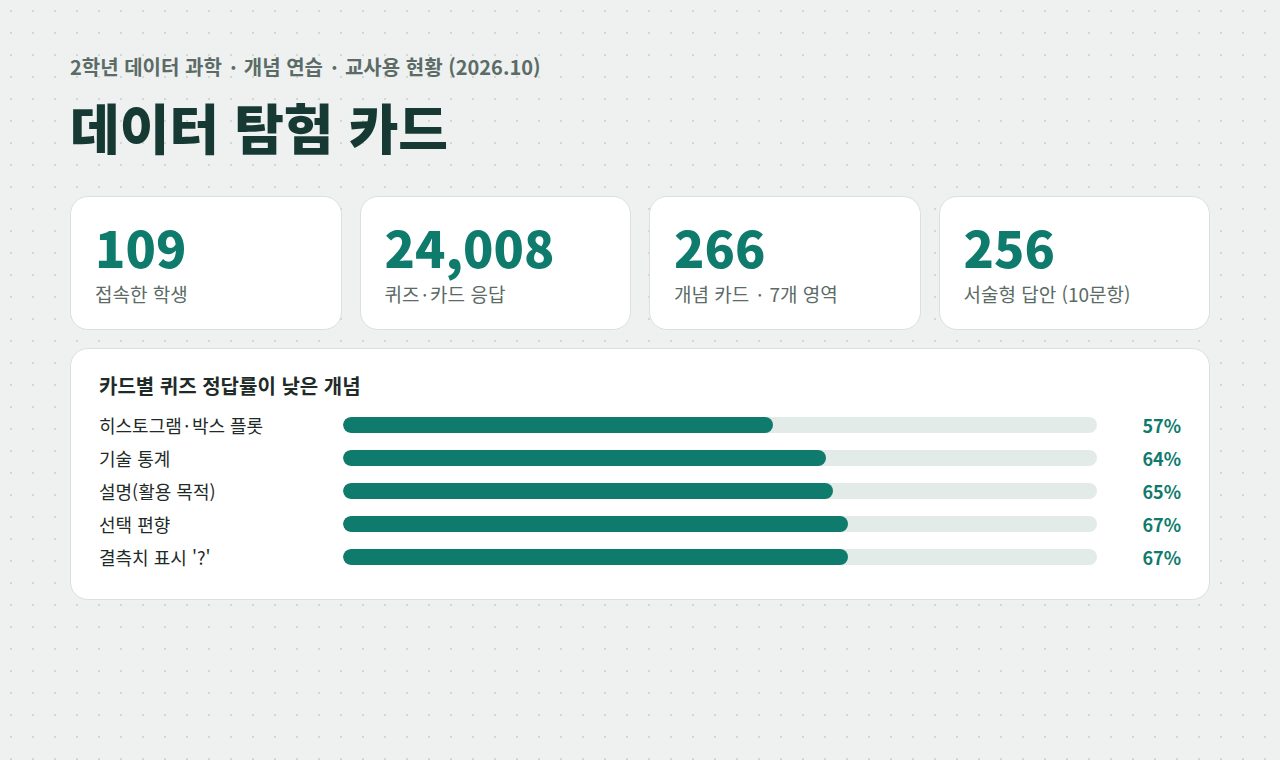
Data Explorer Cards: 109 students, 24,008 answers by October 2026. The teacher view surfaces the weakest concepts (histogram/box plot 57%, descriptive statistics 64%) and pushes them to every student's home screen as “today's problems”.
PyCode Racer, spring 2026: 145 sign-ups, 108 practised; 47 of 60 who took the self-assessment had deep learning flagged as weak, and the app recommends missions for it.
With Copilot
Read Copilot usage reports in the Microsoft 365 admin center the same way: find who stopped, find which task, retrain on that task. The Copilot Adoption Metrics Kit below is being built for this, on synthetic data.
Data Explorer Cards teacher view (Korean), October 2026.
02Adoption playbook
Five steps I already follow for Google Workspace and my classroom systems, written for a Microsoft 365 Copilot rollout.
Why firstFind the three tasks teachers and staff spend the most time on.
Get readyDecide accounts, permissions, data protection and age policy before anyone logs in.
Pilot with championsOne grade or one department, real work, 2–4 weeks.
Train at scaleTrain the trainers → a champion in each school → weekend and online clinics, with a support line that stays open.
Measure and redeployReview usage and results every term; fix what failed and redeploy next term.
Where it comes from: the Google Workspace rollout (200+ schools), train-the-trainer programs for KEDI and EBS, weekend teacher trainings, and every class system I run, which I fix and redeploy each term.
03Live demos
Running now unless marked. Each card says what to look at. The apps are in Korean.
Game-like 2D space for meetings and training: selfie to pixel avatar with a vision-language model running on the Haksung High School AI server, proximity video (WebRTC), Padlet-style boards, polls, attendance CSV and host tools, plus (v0.3) host-run OX quizzes, a daily treasure hunt and seasonal decorations. 124 automated tests.
Look at: how a training session would run in it (Google sign-in).
Concept review app for Year 2 Data Science: 266 cards in 7 areas, mastery levels, ten rubric-scored written questions. Open to other schools: sign up as a teacher or a student, and teacher accounts are approved by the admin.
Look at: the student flow (flip, recall, quiz). Case C shows the teacher view.
Orange3-style visual data analysis in the browser: connect widgets (datasets, tables, charts, models, evaluation, text, images) and export the flow as Python or Jupyter code. Computation and the embedding models run on the CPU of the Haksung High School AI server. 119 widgets, 57 datasets and 30 curriculum-aligned tutorials; teachers can create a class, invite students with a code and follow their progress, and an AI tab answers questions about the selected widget using Sinabro AI on the school server. In a load test with 60 students and 10 AI users at once, 0 of 1,733 requests failed.
Look at: the tutorials and the dataset gallery (no login needed).
Security game: live one life from middle school to old age and meet real-world scams and hacks first. Life Career mode with seasons, habit training, awards, life endings and a share card; 90 incidents, 35 real 2024–2026 cases, 60 achievements and a daily "real or fake?" text quiz. No login.
Look at: one short career (about 10 incidents) and the ending screen.
Stage app for the 2026 Ulsan Science·Math·Informatics Festival opening, where I gave the opening talk: an 18-question QR survey, 8 profiles, live tallies, polls and a 60-second AI quiz. Built for 300 people at once.
Look at: a live-audience tool of the kind a large training day needs.
Copilot Adoption Metrics Kit new · in progress
adoption.cmhong95.com (not live yet)
Synthetic data shaped like Microsoft Graph usage reports, turned into pseudonymized school-level KPIs with small cells hidden, an education-office dashboard, a Korean report and a read-only API. No real student or teacher data.
Look at (when live): each school's status (not started, stalled, growing, leading) and the suggested next action.
“Adoption Coach” Copilot agent new · in progress
Not published yet
A Microsoft 365 Copilot declarative agent being built to call the metrics kit's read-only API and answer “which schools stalled, and what should we train next?” in Korean.